CS 136 - 5 - Arrays and Strings
5.1 - Introduction
Oversized arrays using structures
// This program shows how to create and use an oversized array with structures

#include <stdio.h>

struct oversized_array {
  int len;
  int maxlen;
  int data[10];
};

void bad_print_oversized_array(struct oversized_array arr){
  for (int i = 0; i < arr.len; ++i){
    printf("%d\n",arr.data[i]);
  }
}

void good_print_oversized_array(struct oversized_array *parr){
  for (int i = 0; i < parr->len; ++i){
    printf("%d\n",parr->data[i]);
  }
}

int main(void){
  struct oversized_array arr = {0,10};
  int i = 0;
  while ( scanf("%d", &i) == 1) {
    if (arr.len == arr.maxlen) { // array is full
      printf("Error: array is full.\n");
      break;
    } else {
      arr.data[arr.len] = i;
      ++arr.len;
    }
  }
  good_print_oversized_array(&arr);
}
Stdin:
3 2 9 0 1 7 9 2 3 6 5 jdk 3 9 2k lkjadf
Produces:
Error: array is full.
3
2
9
0
1
7
9
2
3
6
Multi-dimensional data
For example, consider a 2D array with 2 rows and 3 columns.
1 2 3
7 8 9
We can represent this data in a simple one-dimensional array as follows: int data[6] = {1, 2, 3, 7, 8, 9}; To access the entry in row r and column c, we simply access the element at data [r * 3 + c].
In general, it would be data[row * NUMCOLS + col].
Arrays & Pointers
If p is a pointer, the value of (p + 1) depends on the type of the pointer p, which means that (p + 1) will add the sizeof whatever p points at.
- Pointer arithmetic is only valid within an array
- You CANNOT add two pointers
- A pointer
qcan be subtracted from another pointerpif the pointers are the same type (point to the same type). The value of (p - q) in C is given in “normal” arithmetic by: ((p - q) / size(*p)). In other words, ifp = q + itheni = p - q. -
- Pointers (of the same type) can be compared with the comparison operators:
<, <=, ==, !=, >=, >. (e.g.,if (p < q) ...).
Note: The array indexing syntax ([]) is an operator that performs pointer arithmetic. In other words,a[i]is equivalent to*(a + i).
- Pointers (of the same type) can be compared with the comparison operators:
Example:
int sum_array(const int *a, const int len) {
  assert(a);
  assert(len > 0);

  int sum = 0;
  for (const int *p = a; p < a + len; ++p) {
    sum += *p;
  }
  return sum;
}
C Strings
// A program that demonstrates how to initialize strings

#include "cs136-trace.h"

int main(void) {
  char a[4] = {'c', 'a', 't', '\0'};
  char b[4] = {'c', 'a', 't', 0};
  char c[4] = {'c', 'a', 't'};
  char d[4] = {99, 97, 116, 0};
  char e[] = "cat"; // automatic length declaration
  char f[4] = "cat\0";
  trace_array_char(a, 4);
  trace_array_char(b, 4);
  trace_array_char(c, 4);
  trace_array_char(d, 4);
  trace_array_char(e, 4);
  trace_array_char(f, 4);
}
Produces:
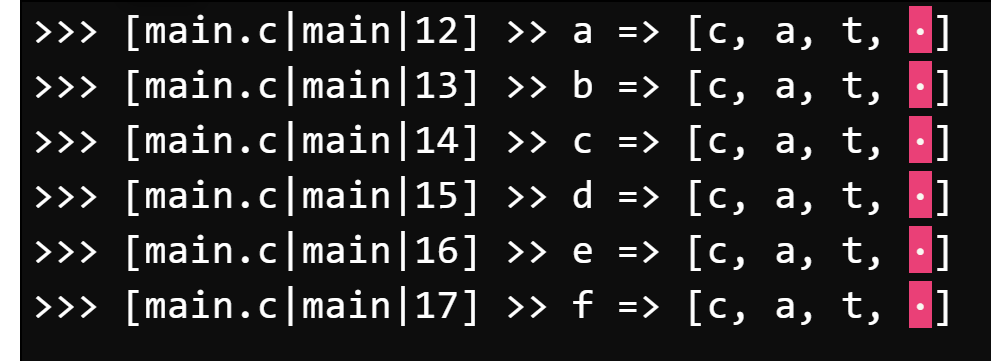
'\0'is equivalent to 0. That is different from'0', which is equivalent to 48 (the ASCII character for the symbol zero).- The null character, also known as a null terminator, is a
charwith a value of zero. It is often written as'\0'instead of just0to improve communication and indicate that a null character is intended.
- The null character, also known as a null terminator, is a
Null termination
Example:
// This program demonstrates how functions do not
// need the length passed as a separate parameter

#include <stdio.h>
#include <assert.h>

// e_count(s) counts the # of e's and E's in string s
int e_count(const char s[]) {            // note the const
  assert(s);

  int count = 0;
  int i = 0;
  while (s[i]) {  // not the null terminator
    if ((s[i] == 'e') || (s[i] == 'E')) {
      ++count;
    }
    ++i;
  }
  return count;
}

int main(void) {
  assert(e_count("apple") == 1);
  assert(e_count("wall-E") == 1);
  assert(e_count("banana") == 0);
}
strlen
- The
stringlibrary (#include <string.h>) provides many useful functions for processing strings - one such useful function isstrlen. This function returns the length of the string, not necessarily the length of the array. In other words, it does not include the null character.
Example:
// This program demonstrates our strlen function

#include <stdio.h>
#include <assert.h>

// my_strlen(s) behaves the same as the built-in strlen function
//   the length does not include the null character
int my_strlen(const char s[]) {
  assert(s);

  int len = 0;
  while (s[len]) {
    ++len;
  }
  return len;
}

// my_strlen_ptr(s) behaves the same as the built-in strlen
//   the length does not include the null character
int my_strlen_ptr(const char *s) {
  assert(s);
  const char *p = s;
  while (*p) {
  	++p;
  }
  return (p - s);
}

int main(void) {
  assert(my_strlen("apple") == 5);
  assert(my_strlen("banana") == 6);
  assert(my_strlen("") == 0);
  assert(my_strlen_ptr("apple") == 5);
  assert(my_strlen_ptr("banana") == 6);
  assert(my_strlen_ptr("") == 0);
}
Careful with where you're putting the strlen (it will be heavily criticized on exams):
Example:
// This program demonstrates a common pitfall to using strlen

#include <string.h>
#include <assert.h>

// char_count(c, s) counts the number of c that appear in the string s
int char_count_bad(const char c, const char *s) {
  assert(s);
  int count = 0;
  for (int i = 0; i < strlen(s); ++i) {     // BAD !!!!
  	if (s[i] == c) ++count;
  }
  return count;
}

// char_count(c, s) counts the number of c that appear in the string s
int char_count(const char c, const char *s) {
  assert(s);
  int count = 0;
  int len = strlen(s);
  for (int i = 0; i < len; ++i) {
  	if (s[i] == c) ++count;
  }
  return count;
}

int main(void) {
  assert(char_count_bad('a', "banana") == 3);
  assert(char_count('a', "banana") == 3);
}
Lexicographical order
To compare strings we are typically interested in using a lexicographical order. To compare two strings using a lexicographical order, we first compare the first character of each string. If they are different, the string with the smaller first character precedes the other string. Otherwise (the first characters are the same), the second characters are compared, and so on.
If the end of one string is encountered, it precedes the other string. Two strings are equal (the same) if they are the same length and all of their characters are identical. For example, the following strings are in lexicographical order:
"" "a" "az" "c" "cab" "cabin" "cat" "catastrophe"
- The
<string.h>library functionstrcmpuses lexicographical ordering. strcmp(s1, s2)returns zero if the strings are identical. Ifs1precedess2, it returns a negative integer. Otherwise (s1followss2) it returns a positive integer.
Example of ownstrcmp:
// This program demonstrates string comparisons with strcmp

#include <stdio.h>
#include <assert.h>


// my_strcmp(s1, s2) behaves the same as strcmp and returns:
//   s1 preceeds s2      => negative int
//   s1 identical to s2  => 0
//   s1 follows s2       => positive int
int my_strcmp(const char s1[], const char s2[]) {
  assert(s1);
  assert(s2);
  int i = 0;
  while (s1[i] == s2[i] && s1[i]) {
    ++i;
  }
  return s1[i] - s2[i];
}

int main(void) {
  char a[] = "the same?";
  char b[] = "the same?";
  char c[] = "the samej?";
  char *s = a;

  assert(a != b);
  assert(a == s);

  assert(my_strcmp(a, b) == 0);
  assert(my_strcmp(a, c) < 0);
  assert(my_strcmp(c, a) > 0);
}
strcpy: Thestrcpyfunction (strcpy(dest, src)), which is part of<string.h>) overwrites the contents ofdestwith the contents ofsrc.
Our own implementation:
// This program demonstrates our strcpy function

#include <string.h>
#include <assert.h>
#include "cs136-trace.h"


// my_strcpy(dest, src) behaves the same as the built-in strcpy function
char *my_strcpy(char *dest, const char *src) {
  assert(dest);
  assert(src);
  char *d = dest;
  while (*src) {
  	*d = *src;
  	++d;
  	++src;
  }
  *d = '\0';
  return dest;
}

int main(void) {
  char a[] = "cat";
  char b[4] = "dog";
  my_strcpy(b, a);
  trace_string(a);
  trace_string(b);
  assert(!strcmp(a, b));
}
strcat(strcat(dest, src), which is also part of<string.h>library) is similar tostrcpy, except it copies (appends or concatenates)srcto the end ofdest.
Our own implementation:
// This program demonstrates our strcat function

#include <string.h>
#include <assert.h>
#include "cs136-trace.h"


// my_strcat(dest, src) behaves the same as the built-in strcat function
char *my_strcat(char *dest, const char *src) {
  assert(dest);
  assert(src);
  strcpy(dest + strlen(dest), src);
  return dest;
}

int main(void) {
  char a[] = "cat";
  char b[7] = "dog";
  my_strcat(b, a);
  trace_string(a);
  trace_string(b);
  assert(!strcmp(b, "dogcat"));
}