CS 136 - 3 - C Model
3.1 - Control Flow
Models of computation
- It's not like Racket where there are substitutions and "stepping rules"
- We model C with two mechanisms:
- control flow, and
- memory
Control Flow
- We use control flow to model how programs are executed
- We keep track of program location ("where" in the code the execution is currently occurring)
Types of control flow
- Compound statements (blocks)
- Function calls
- Conditionals (
ifstatements) - iteration (loops)
Looping
- Syntax for a
whileloop:
while (expression) statement
whileloops will repeatedly loop back until the expression is false
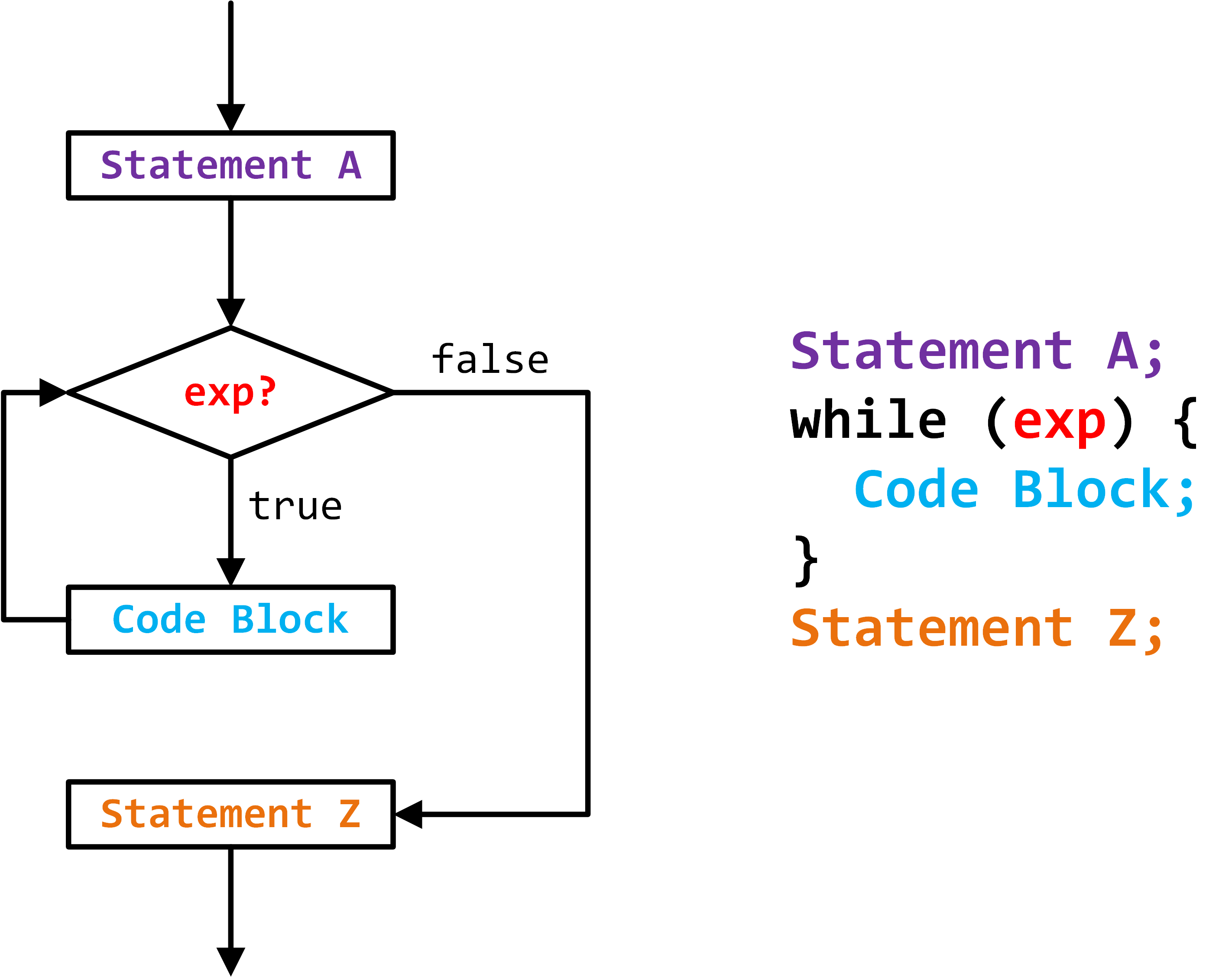
Example:
// this is our first loop program

#include "cs136.h"

int main(void) {
  int i = 2;
  while (i >= 0) {
    printf("%d\n", i);
    --i;
  }
}
Produces:
2
1
0
Iteration vs. recursion
- Iteration is an alternative to recursion and is much more common in imperative programming
- Sometimes iteration is better, more efficient and easier to code
- Other times, recursion is! (Like when doing inorder tree traversal)
Example:
- Other times, recursion is! (Like when doing inorder tree traversal)
// this program demonstrates the conversion between simple recursion and
//   iteration

#include "cs136.h"

// recursive_sum(k) finds the sum of the numbers 0...k using simple recursion
int recursive_sum(int k) {
  if (k <= 0) {
  	return 0;
  }
  return k + recursive_sum(k - 1);
}

// iterative_sum(k) finds the sum of the numbers 0...k
int iterative_sum(int k) {
  int s = 0;
  while (k > 0) {
  	s += k;
    --k;
  }
  return s;
}

int main(void) {
  trace_int(recursive_sum(5));
  trace_int(iterative_sum(5));
}
Produces:
>>> [main.c|main|25] >> recursive_sum(5) => 15
>>> [main.c|main|26] >> iterative_sum(5) => 15
You can also nest loops!
Example:
// this is our first "nested" loop

#include "cs136.h"

int main(void) {
  int i = 5;
  while (i >= 0) {
    int j = i;
    while (j >= 0) {
      printf("*");
      --j;
    }
    printf("\n");
    --i;
  }
}
Produces:
******
*****
****
***
**
*
Tracing tools
- Can be useful in debugging code
do ... while
Syntax for a do ... while loop:
do statement while (expression);
- The difference between while loops is that they always do the statement at least once
break
- Useful for exiting from the middle of a loop
- NOTE: break only terminates loops - you cannot break out of an if statement
continue
continueskips over the rest of the statements in the current block ({}) and "continues" with the loop
Example for break and continue:
// this program demonstrates the use of the break statement

#include "cs136.h"

// odd(n) returns true if a number is odd and false otherwise
bool odd(n) {
  return (n % 2 != 0);
}

int main(void) {
  int n = 0;
  while (1) {
    if (1 != scanf("%d",&n)) {
      break;
    }
    if (!odd(n)) {
      continue;
    }
    printf("%d\n", n);
  }
}
for loops
- They are essentially a "condensed" version of a while loop
- Syntax is something like:
for (setup; expression; update) {
   body statement(s)
}
- DO NOT USE the comma (
,) operator in this course.- It allows you to do something like:
for (i = 1, j = 100; i < j; ++i, --j) {...}
3.2 - Memory and Variables
Memory
- One bit of storage (in memory) is either 0 or 1
- A byte is 8 bits long
- Each byte in memory is one of 256 possible states
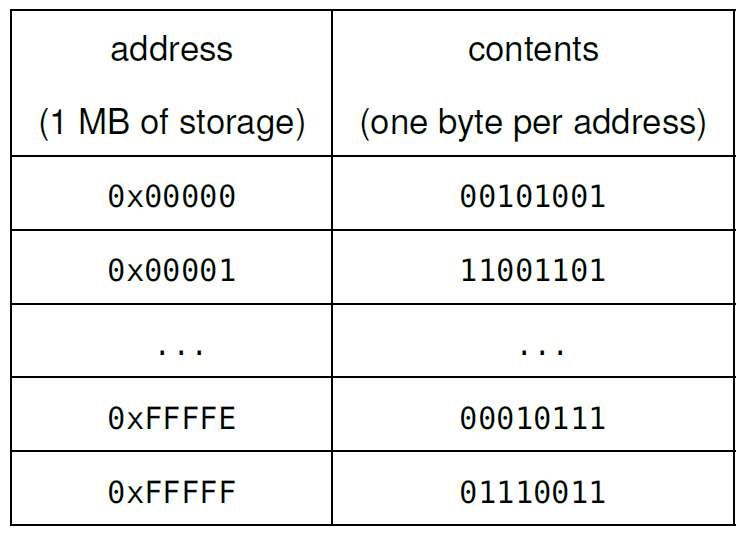
- A byte's position in memory is known as the address of the byte
- In this course, we deal with bytes, not individual bits
- NOTE: Memory addresses are represented in hex, so the address of the first byte is 0x0 and the address of the last byte is 0xFFFFF
- Computer memory is like a collection of "labeled mailboxes" where each mailbox stores a byte
- This example is arbitrary but it would be something like this:
Defining Variables
- In C, variable definitions
- reserve (or "find") space in memory to store the variable
- are kept track of (the address of the storage location)
sizeof
- Depending on the machine and compiler, the amount of space required to store a value of a variable can differ
- The size operator (
sizeof) produces the number of bytes required to store a type sizeofis NOT a function, it is an operator- In this course, one integer is 4 bytes (32 bits)
Example:
// this program demonstrates the sizeof an int

#include "cs136.h"

int main(void) {
  int n = 0;
  trace_int(sizeof(int));
  trace_int(sizeof(n));
}
Produces the output:
>>> [main.c|main|7] >> sizeof(int) => 4
>>> [main.c|main|8] >> sizeof(n) => 4
Integer limits
- Since C uses 4 bytes (32 bits) to store an
int, there are only( ) possible values for an int - The range of C
intvalues is, or - The constants INT_MAX and INT_MIN store those values
Overflow
- Just be super careful
- There are C modules available that provide similar features to Racket for arbitrary large numbers (a popular one is available at
gmplib.org).
The char type
- Also used to store integers
- C allocates one byte of storage for a char (an int uses 4 bytes)
- That means, there are
( ) possible values for a char
ASCII
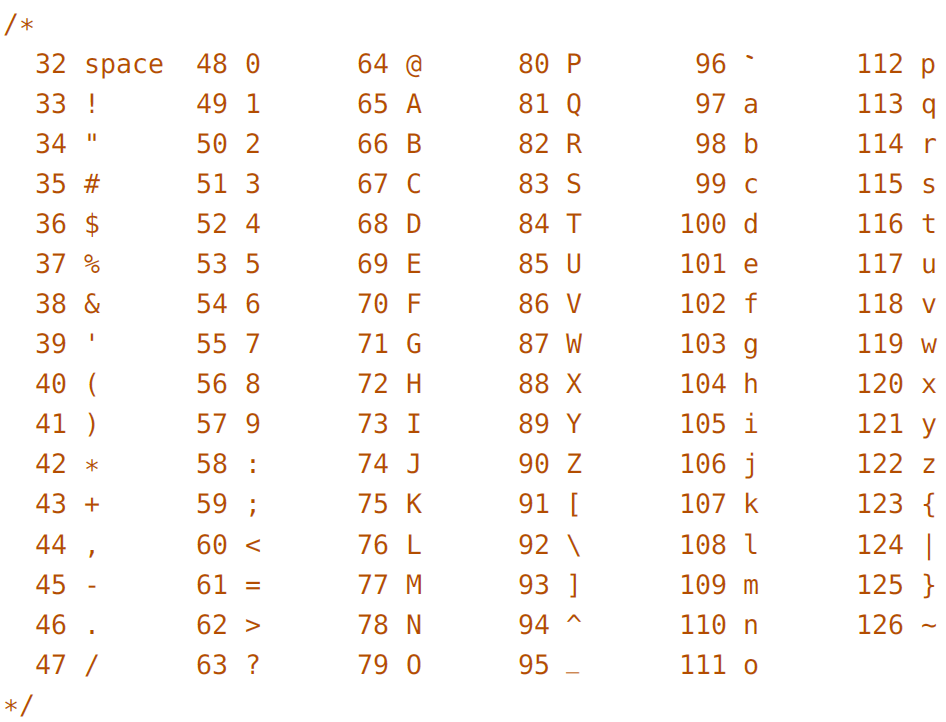
- The American Standard Code for Information Interchange (ASCII) was developed to assign a numeric code to each character
- These are the only important ones (ASCII Table):
- In today's day and age, ASCII is outdated and people have moved onto the Unicode character set which supports over
characters - We don't use Unicode in this course!
C Characters
- Single quotes (') denote ASCII characters
- For example, 'G' is equivalent to 71
- The
printfformat specifier to display a character is"%c" - NOTE: Always use single quotes with characters: "a" is not the same as 'a'.
Example:
// this program shows that 'a' and 97 are equivalent

#include "cs136.h"

int main(void) {

  char letter_a = 'a';
  char ninety_seven = 97;

  printf("letter_a as a character:   %c\n", letter_a);
  printf("ninety_seven as a char:    %c\n", ninety_seven);

  printf("letter_a in decimal:       %d\n", letter_a);
  printf("ninety_seven in decimal:   %d\n", ninety_seven);

}
Produces:
letter_a as a character:   a
ninety_seven as a char:    a
letter_a in decimal:       97
ninety_seven in decimal:   97
Character arithmetic
- Since C interprets characters as integers, characters can be used in expressions
- Helps you avoid "magic numbers"
Reading characters from input
- The format specifier to read a single character is
%c.
Example:
// this program reads in characters and prints them out,
// while converting to lowercase

#include "cs136.h"

// is_lowercase(c) returns true if c is lowercase and false otherwise
bool is_lowercase(char c) {
  return (c >= 'a') && (c <= 'z');
}

// to_lowercase(c) converts upper case letters to
//   lowercase letters, everything else is unchanged
char to_lowercase(char c) {
  if ((c >= 'A') && (c <= 'Z')) {
    return c - 'A' + 'a';
  } else {
    return c;
  }
}

int main(void) {
  while (1) {
    char c = 0;
    int retval = scanf("%c",&c);
    if (retval != 1) {
      break;
    }
    if (!is_lowercase(c)) {
      printf("%c", to_lowercase(c));
    } else {
      printf("%c", c);
    }
  }
}
Stdin:
SdfV3J; kla;LsASDFNC
dfF \n aAsklDjdEfK8 3
Produced Output:
sdfv3j; kla;lsasdfnc
dff \n aaskldjdefk8 3
Whitespace and reading characters
- When reading an
intwithscanf, C ignores whitespace (space and newlines) that appears before the next int
Symbol type
- No equivalent to Racket's
symboltype - C symbols are constants (often
ints) with meaningful names - Use
ALL_CAPSfor symbol names
3.3 - Memory - Structures
Structures
- Structures (compounded data) are similar to structures in Racket
- Keyword
structbefore the name of the structure - The entire structure is enclosed with curly braces
- There is a semi-colon at the very end of the structure
- Keyword
- NOTE: Do not forget the last semicolon (;) in the structure definition.
- Racket uses selector functions, but C uses structure operator (
.) which selects the requested field- Syntax is:
variable_name.field_name
- Syntax is:
// Usual initialization:
struct posn {       // name of the structure
  int x;            // type and field names
  int y;
};                  // don't forget this ;

// You would then use it like such:
int main(void) {
  struct posn p = {1, 2};

  trace_int(p.x);
  trace_int(p.y);
}

// Can initialize as such:
struct posn p = { .y = 4, .x = 3};

// any omitted fields are automatically zero, which can be useful! Like so:
struct posn p = {.x = 3}; // .y = 0
Mutation with structures
- The assignment operator can be used with
structs to copy all the fields from anotherstruct - Individual fields can also be mutated
- The equality operator (
==) does not work with structures
Structures in the memory model
- Structure definitions do not reserve any memory
- Memory is only reserved when a
structvariable is defined
- Memory is only reserved when a
sizeof a struct
- You MUST use the
sizeofoperator when determining the size of a structure as it's not really easy to tell
3.4 - Memory - Sections
Sections of memory
- In this course, there are five sections (or "regions") of memory:
| CODE |
|---|
| READ-ONLY DATA |
| GLOBAL DATA |
| HEAP |
| STACK |
The code section
- When you program, you write source code in a text editor using ASCII characters that are "human readable"
- To "run" a C program, the source code is converted into machine code (this is known as compiling) that is "machine readable"
- This machine code is then placed into the code section of memory where it can be executed
The read-only & global data sections
- Global variables are available throughout the entire execution of the program, and the space for the global variables is reserved before the program begins execution
- First, the code from the entire program is scanned and all global variables are identified.
- Next, space for each global variable is reserved.
- Finally, the memory is properly initialized.
- This happens before the main function is called
- NOTE: All global variables are placed in either the read-only data section (constants) or the global data section (mutable variables).
3.5 - Memory - Stacks and Recursion in C
Function Calls (revisited)
- We model function calls with a stack and store the information in the stack section of memory
Stacks
- In computer science, similar to a physical stack of items where they are "stacked" on top of each other
The Call stack
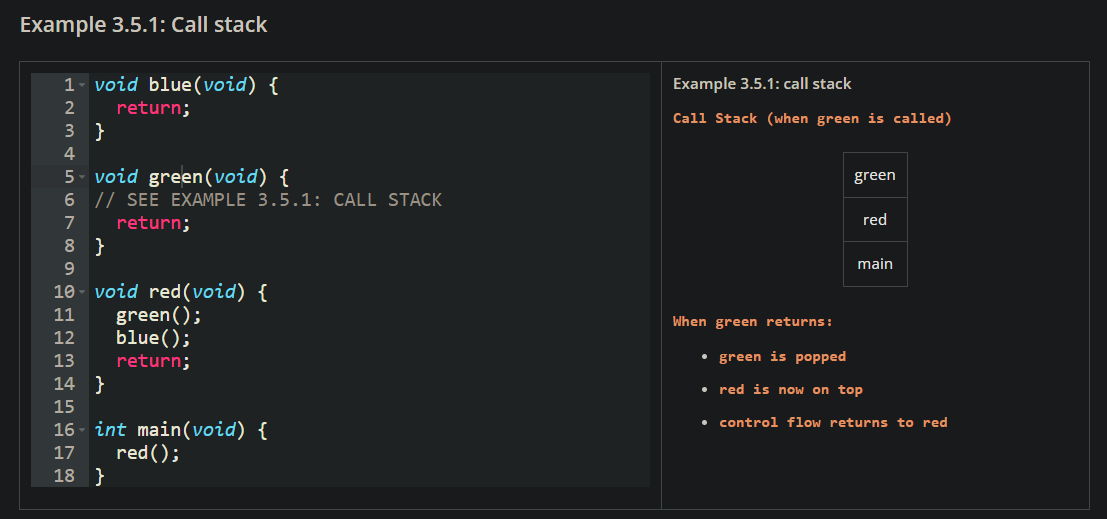
- Whenever a function is called, we can imagine that it is pushed onto a stack, and it is now on the top of the stack.
- If another function is called, it is then pushed so it is now on top.
- When a function
returns, it is popped off of the stack, and the control flow returns to the function now on top.
Example:
The return address
- When C encounters a
return, it needs to know: “where was the program location before this function was called?"- it must “remember” the program location to “jump back to” when
returning. This location is known as the return address. - In this course, we use the name of the calling function and a line number (or an arrow) to represent the return address. The operating system calls the
mainfunction, so that is shown as "OS".
- it must “remember” the program location to “jump back to” when
Stack frames
- The “entries” pushed onto the call stack are known as stack frames
- Each function call creates a stack frame (or a “frame of reference”). Each stack frame contains:
- the argument values
- all local variables (both mutable variables and constants) that appear within the function block (including any sub-blocks)
- This also includes for and while loops
- the return address (the program location within the calling function to return to)
Example:
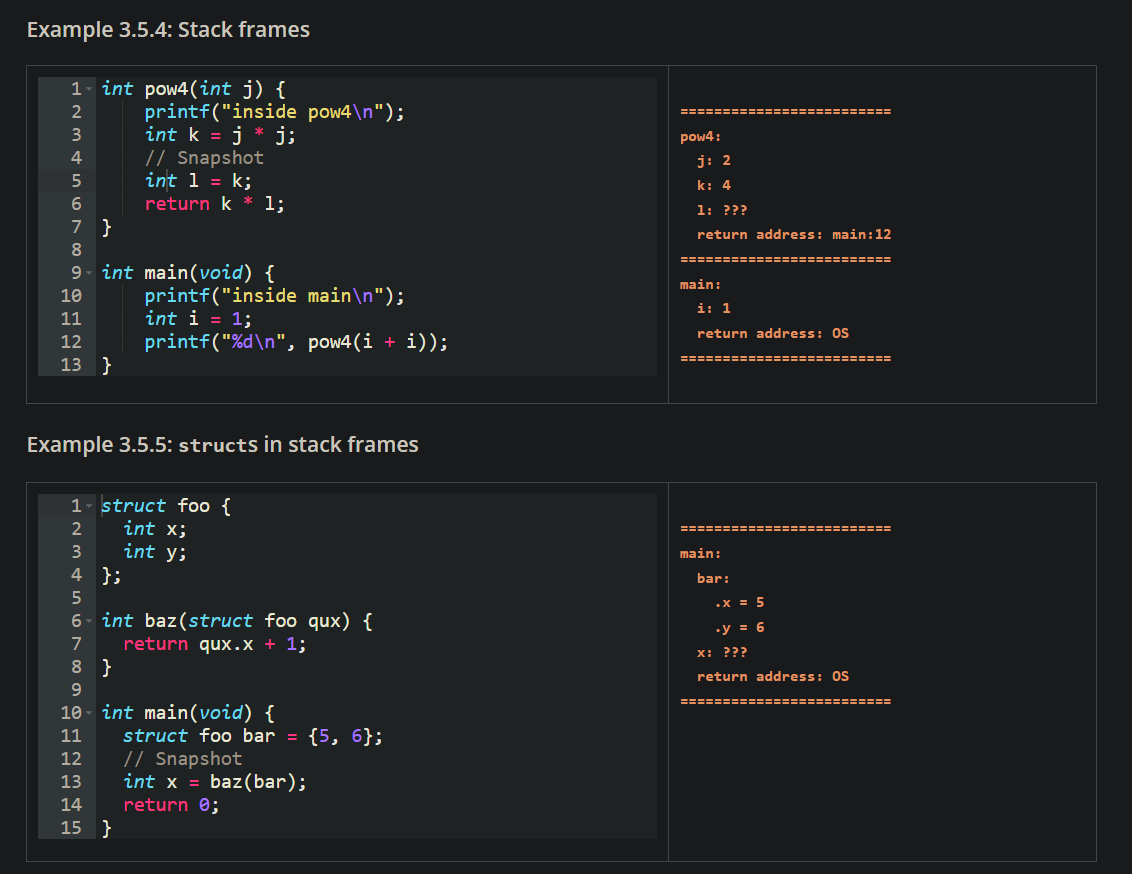
- NOTE: C makes a copy of each argument and places the copy in the stack frame
- This is known as "pass by value" convention
- In C, local variables are known as automatic variables because they are “automatically” created when needed
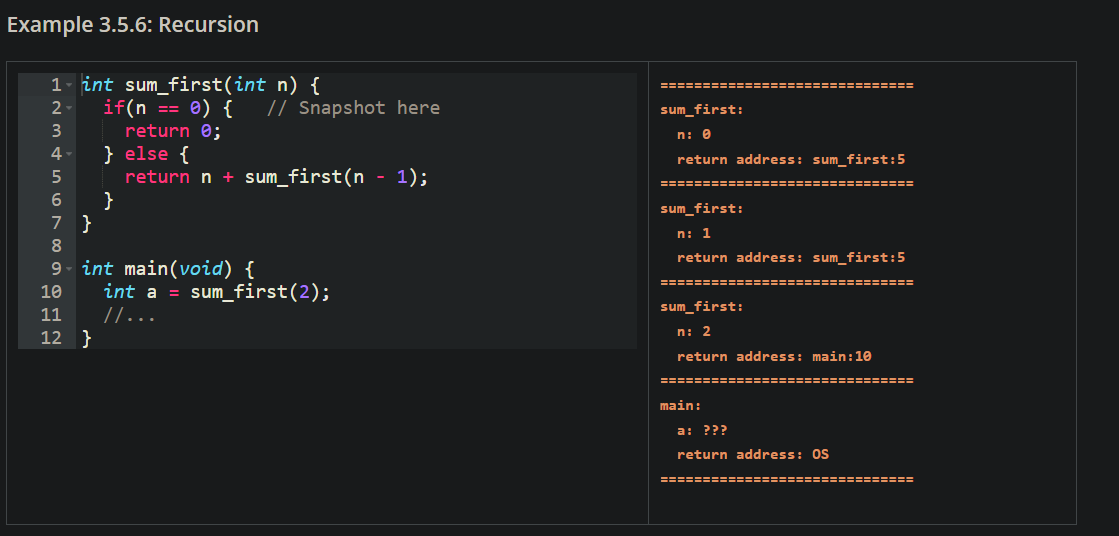
Recursion in C
- Each recursive call is a new stack frame
Example:
Stack section
The call stack is stored in the stack section, the fifth section of our memory model. We refer to this section as “the stack”.
Uninitialized memory
Always initialize variables!