CS 136 - 1 - Functional C
1.1 - History and Expressions
A Brief History
C got its name by the creator, Dennis Ritchie in 1969-73 based on the other programming language at-the-time B. C has "low-level" access to memory (talked about later), thousands of programs are written in it, and portions of every single operating system use C in some capacity.
Remember, C reads from RIGHT TO LEFT.
C Versions
We use the C99 standard (from 1999), but there is also C11 (2011), C18 (2018), and C23 (2024).
Comments
Use // for single line
Use /* comments go here */ for multi-line.
C's multi-line comments cannot be nested. For example,
/* comment /* goes here, */ okay?*/
throws an error.
Expressions
THEY USE INFIX, NO MORE STUPID RACKET. You can type 3+3 which is evaluated to 6.
Operators
There is over 40 operators and the order is complicated (see CP:AMA Appendix A).
C does not have an exponential operator (e.g.
The / operator
When working with integers, the C division operator (/) truncates the decimals (runs towards zero).
For example,
The
The C modulo operator (
For example,
It is often best to avoid the
1.2 - Identifiers and Functions
C identifiers
Every function, variable, and structure requires an identifier ("name"). They must start with a letter, and can only contain letters, underscores or numbers.
In this course, you must use underscore_style (snake case) if there are compound words.
For example, hst_rate or tree_height
Anatomy of a function
- braces ({}) indicate the beginning/end of a function block
- return keyword, followed by an expression
- parameters are separated by a comma
- the function and parameter types are specified (i.e. int)

To call this function, we type my_add(
We would then say the values
Static Type System
C uses a static type system: all types must be known before the program is run and the type of an identifier cannot change. For example, if we set int a, it (1) must be set like that before the program is run, and (2) cannot be changed later on.
Something like my_add("hello",
In C, integer values that start with a zero are evaluated in octal (base
Functions without parameters
The word "void" means "nothing". If you don't use "void", C will still understand it. However, this is bad form and always use "void" to clearly communicate that there are no parameters.
For example, calling my_num()

No nested functions
You can't define a function inside another function.
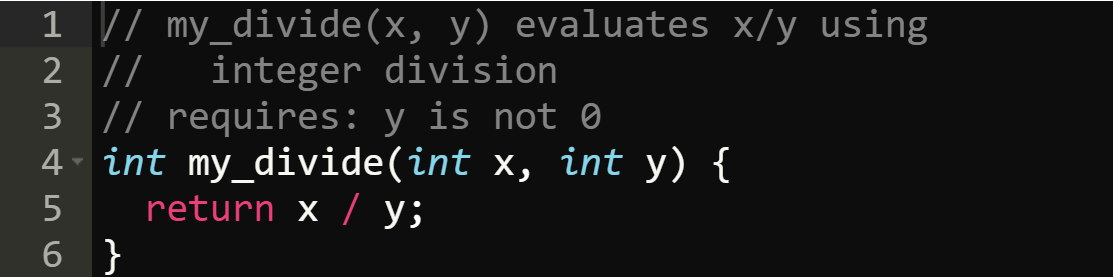
Function documentation
You are required to provide a purpose for every function that shows an example of it being called, followed by a brief description of what the function does. The purpose below are on lines 1 and 2. Contract types are unnecessary.
Whitespace
C mostly ignores whitespace. However, you want to include it for ease of reading and the CS 136 Style Guide.
1.3 - The main Function and Tracing Code
Files in a C program
When programming in C, we encounter 4 types of files:
- Implementation files with an extension of
.c - Header files with an extension of
.h - Compiled files with an extension of
.o(sometimes.ll) - Executable files with a default name of
a.out
Entry point
C is a compiled language and therefore C programs can be run directly by the hardware via the OS. However, we have to compile the human-readable C code to machine-readable (binary) code. If no errors are found, compilers will produce a single executable file. During this process, compiled files (extension .o/.ll) can be optionally created. The executable file has machine-readable code.
In C, the entry point (instead of being the top of the file) is the main function. Every C program must have one (and only one) main function.
main
main has no parameters and an int return type. It has one parameter which is "void". The return value communicates to the OS the "error code". A successful program returns zero.
Our main functions should never return a non-zero value.
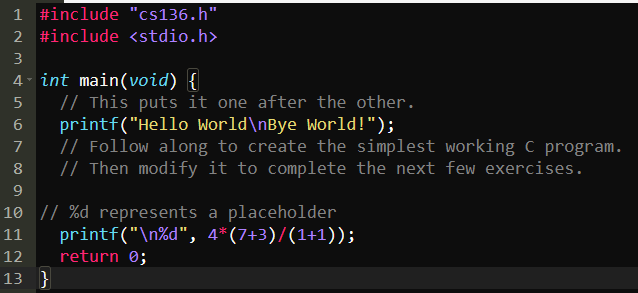
This is a simple "Hello World!" in C.

The printf function
Producing output is considered a side-effect.
The printf function is part of the C library. To call it, we #include directive - in this case, stdio.h.
In C, top-level expressions (code outside of a function) is not allowed.
- %d represents a placeholder, you can have multiple and you just add another argument to printf.
Tracing Expressions
Leave tracing in the code. Marmoset ignores it and it is actually very helpful.
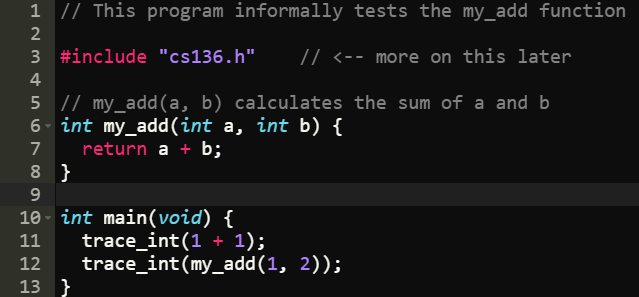
Tracing Tools Documentation
/****************************************************************************
TRACING TOOLS
****************************************************************************/
// These tracing tools can be used to help debug your code.
// They will not interfere with Marmoset tests or any I/O testing.
// trace_msg(msg) Displays msg in the console
// trace_X(exp) displays a message in the console of the form:
// exp => final value
// X can be one of: int, long, bool, char, double, string, ptr, symbol
// example usage:
// trace_msg("Hello, World!");
// trace_int(1 + 1);
// trace_array_Y(arr, len) displays a message in the console of the form:
// arr => [arr[0], arr[1], ...., arr[len-1]]
// Y can be one of: int, bool, char, double, ptr, symbol
// example usage:
// int a[6] = {4, 8, 15, 16, 23, 42};
// trace_array_int(a, 6);
// trace_printf(str, arg1, arg2, ...) displays a message in the console
// using the printf format specifier syntax
// note: adds a newline automatically
// WARNING: unlike printf, it does NOT detect errors or mismatches between the
// number or type of format specifiers so bad combinations such as
// trace_printf("%s") or trace_printf("%s", 42) may crash
// example usage:
// trace_printf("the value of x is %d and y is %d", x, y);
// trace_off() Turns off all tracing messages
// [by default they are turned on]
void trace_off(void);
// trace_sync() "Synchronizes" tracing and printf output by
// forcing all of the tracing messages to go to the same
// stream as printf (stdout)
// NOTE: this may cause your Marmoset and I/O tests to fail
void trace_sync(void);
// trace_version() displays the current version of the cs136 tools library
void trace_version(void);
Program Documentation
Document a program at the top of the file. There is no need to add documentation for main itself.
Wrong Order
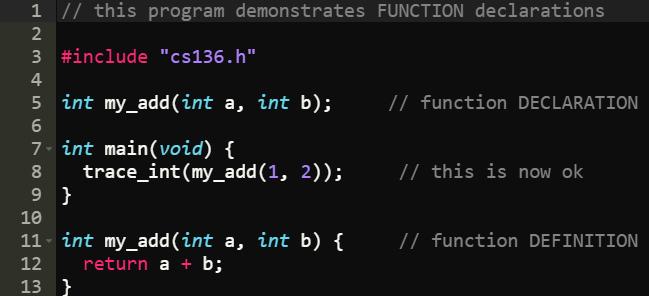
If you call a function in main, it must above the main function, or you can just declare the function which tells the compiler that you will define it later.
1.4 - Testing Code
Boolean Expressions
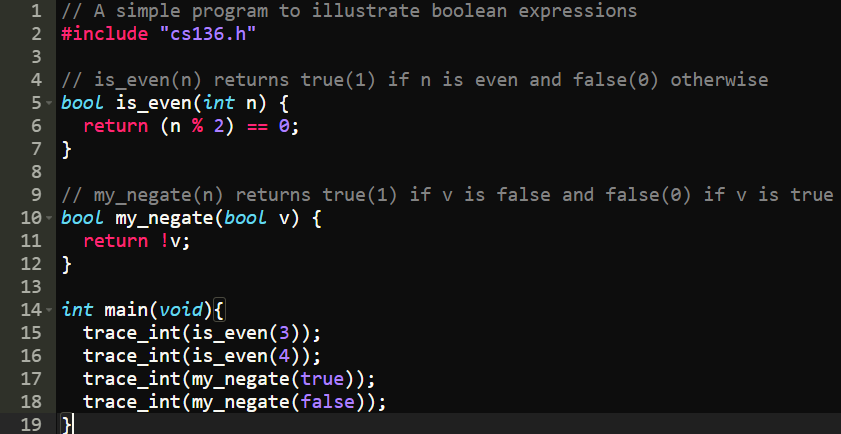
In C, Boolean expressions do not produce true or false. They produce either:
- zero (
) for false, or - one (
) for true.
Comparison operators
The equality operator in C is == (yes, that's two equal symbols.)
(
(
The not equal operator is !=.
(
(
The operators
(
(
Logical operators
The Logical operators are: ! (not), && (and), || (or):
!(
!(
(
!(
When the value of an expression is known, C will short-circuit.
All non-zero values are true
Operators that produce a Boolean value will always produce either 0 or 1. So, any non-zero value is "true".
The value NULL is also considered false.
For example,
!(
bool type
- a
booltype can only have the value 0 or 1.
Assertions
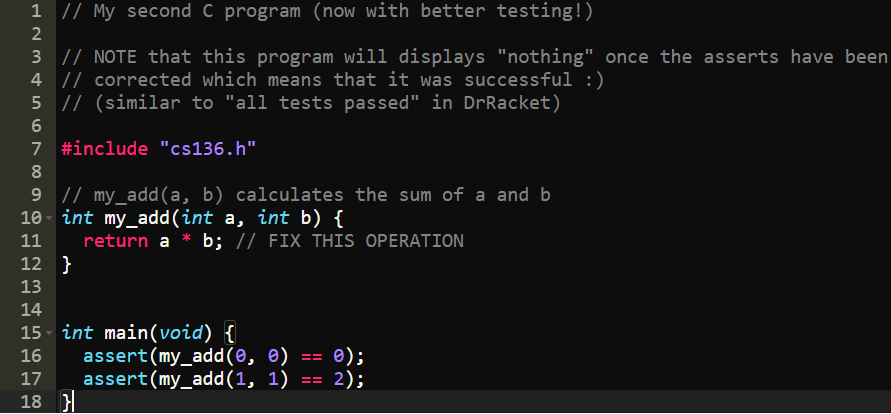
the assert function is similar to check-expect's in Racket. We will be required to use it to formally test our code.
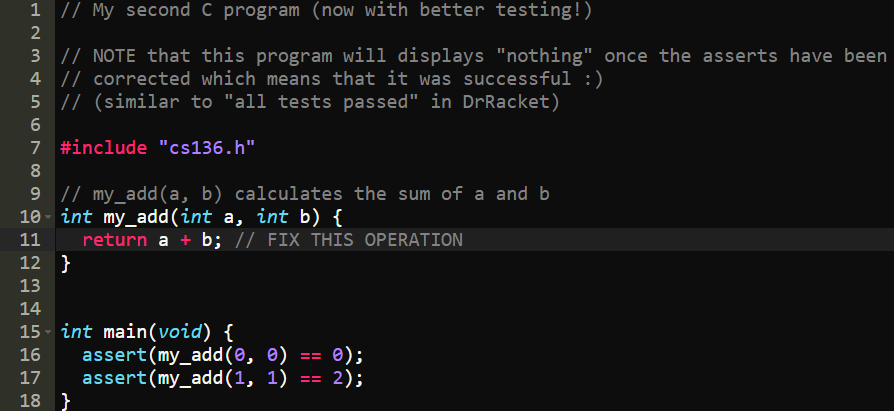
The way assert works is if it catches an error, it will give an output. If all the "tests" pass, then it says nothing.
For example, this will give an error
This is the corrected file:
Function requirements
Assert any feasible function requirements!
For example,
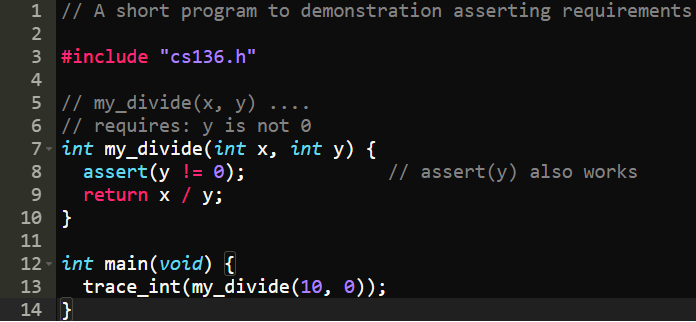
The reason assert(y) also works is because if y is assert, it is false and throws an error.
Infeasible Requirements
Sometimes, it is extremely inifficient to assert, so it is good style to communicate that a requirement is not asserted as follows:

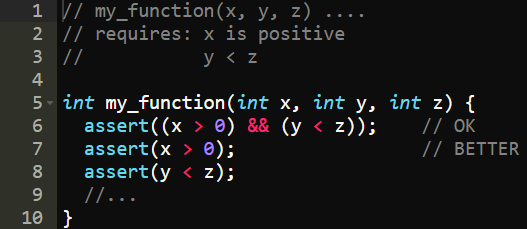
Multiple Requirements
If there are multiple requirements, it is better to have small asserts to determine the exact requirement that is not met.
For example,
How to avoid code bugs
Keep it simple stupid. Keep it clean. Keep it as manageable as possible that you can manage yourself. By doing so, you ensure your code is easier to understand, is less prone to errors and is easier to debug.
Some tips:
- Start with tests. See [[#Developing good tests]].
- Use well-named helper functions rather than long, convoluted functions. Frequent use of small helper functions make code:
- Easier to read
- Easier to check for correctness
- Easier to test and debug
- Write the smallest, easiest to understand helper functions first and test them to be sure before moving on to the next piece of your program
Developing good tests
- Before you write a single line of code, write tests
- Ensures you understand what is being asked of in the assignment
- Easier to design code to pass the tests than to try to patch it later
- When writing these test cases, start with simple test cases and work up to more difficult ones
- Think of yourself as an enemy whose goal is to try to break the code and think of edge cases
Determining the source of code bugs
Follow these steps:
- Fix one bug at a time. This is typically faster than trying to fix more than one thing at once.
- Try to find a simple test case that triggers the bug.
- Come up with an educated guess about what could be wrong.
- Come up with a way to test the hypothesis.
In a file, keep logs of bugs you encounter. You can then refer back to them and also it will help to remember the problem and the fix to avoid creating the same problem in the future.
1.5 - Statements and control flow
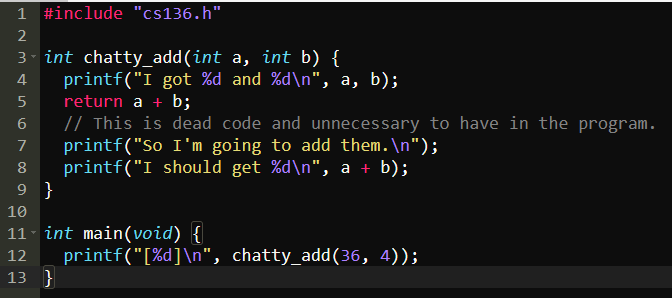
The return statement is a special kind of statement known as a control flow statement. This means that the return "controls the flow" of the program by ending the function and returning to caller.
- Anything after a return function is dead code.
Types of control flow
We explore four types of control flow:
- compound statements (blocks)
- function calls
- conditionals (i.e.,
ifstatements) - iteration (i.e., loops)
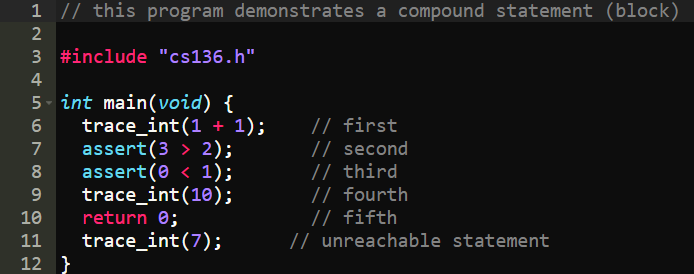
Compound Statements (Blocks)
Blocks ({}) can contain multiple statements.
Statements are executed in sequence (one after the other) until the end of the function or a return statement. Return statements end the function.
Function calls
- When a function is called, the program "jumps" from the current location to the start of the function.
- The
returncontrol flow statement changes the program location to go back to the most recent calling function (aka where it "jumped from")
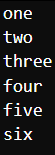
As an example:
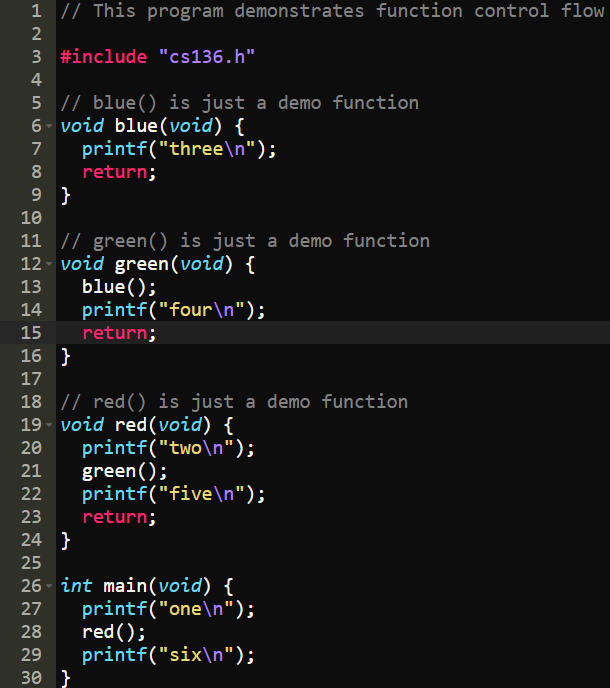
Produces:
Conditionals (if)
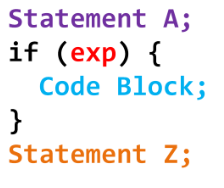
The syntax of if is
if (expression) statement
- where the statement is executed if and only if the expression is true
This is how all if statements should be styled:
Conditionals (else)
Can be combined with if if there are two conditions.
For example,
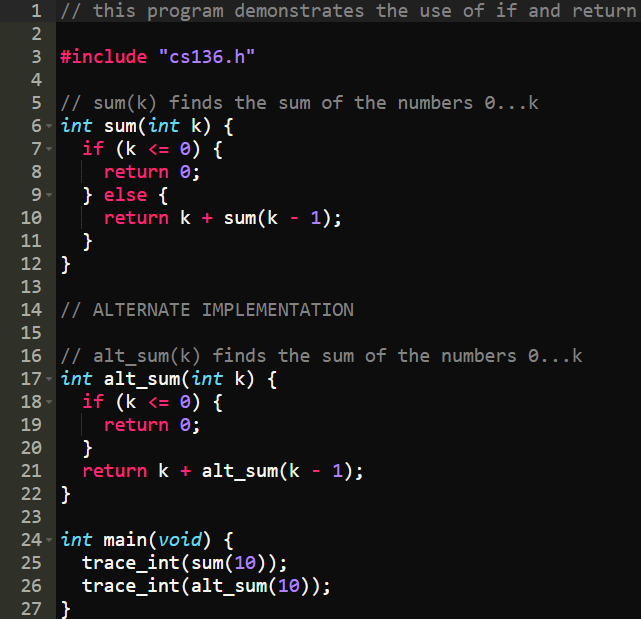
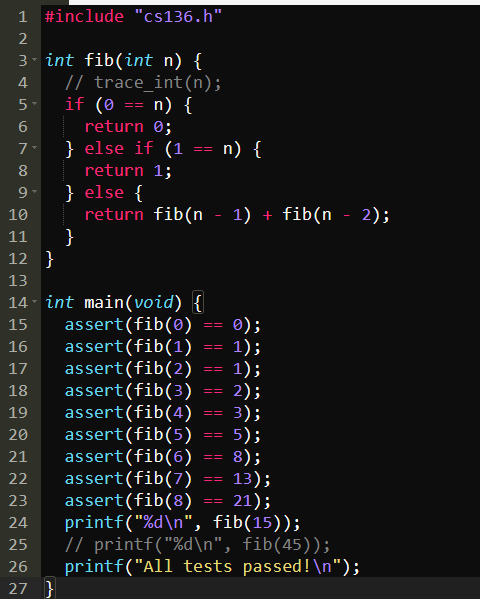
Example of recursion in C
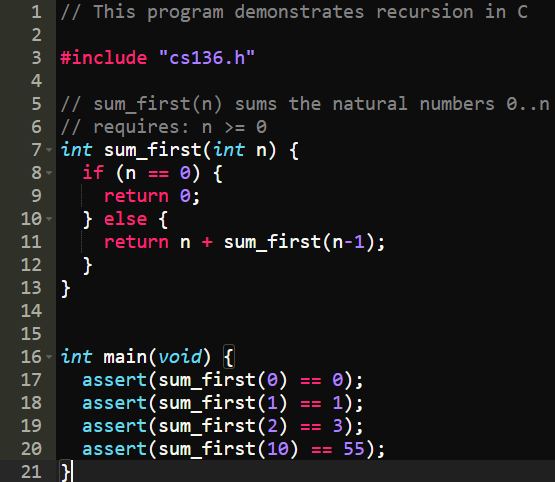
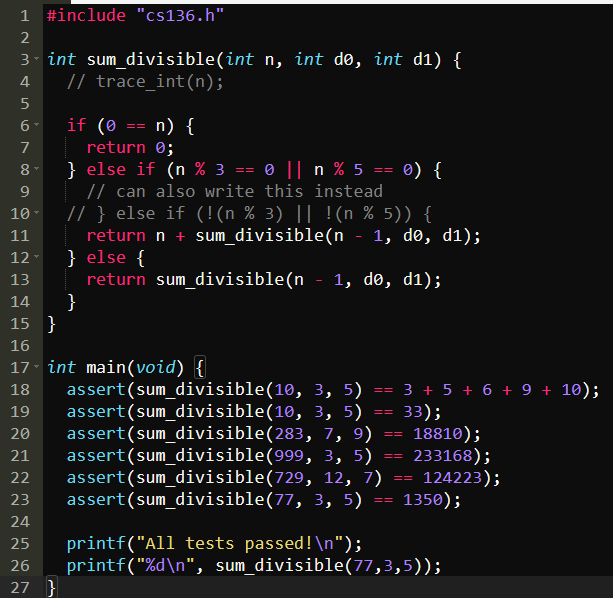
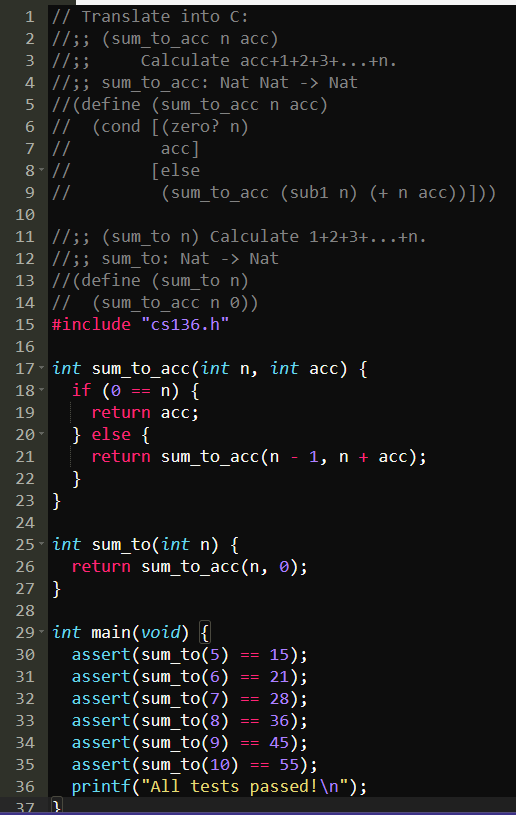
- Accumulative recursion runs EXTREMELY fast in C since it's a complied programming language
Accumulative version of Fibonacci Sequence
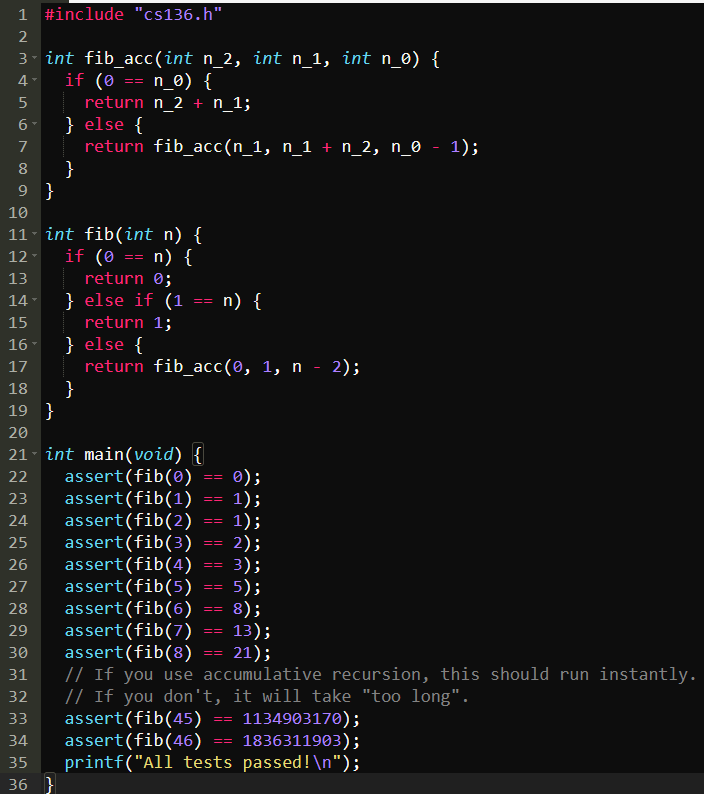
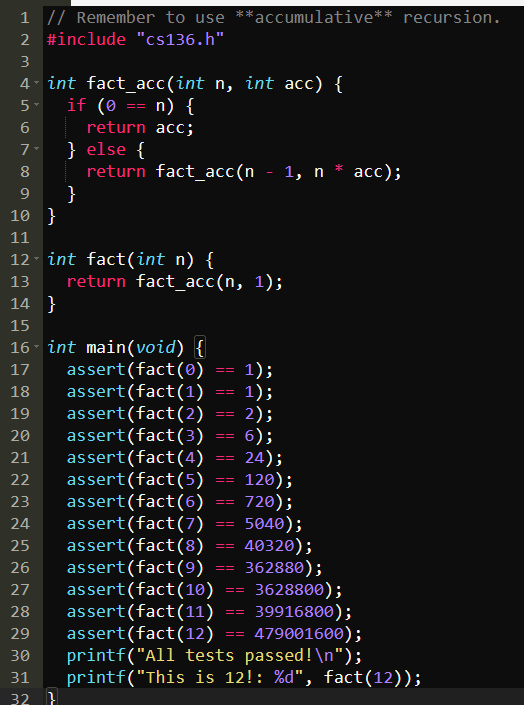
Accumulative version of factorial (!):
Conditionals (else if)
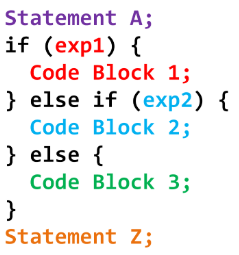
When there are more than two possible results, use else if. Use this style:
Conditionals and return values
- C's if statements does not produce a value, it only controls the "flow of execution".
- This is different from racket as it actually produces a value and can be used inside an expression. For example, you can do the following in Racket:
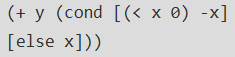
- This is different from racket as it actually produces a value and can be used inside an expression. For example, you can do the following in Racket:
- C does have a ternary conditional operator (
?:) which does produce a value- The value of the expression q ? a : b is a if q is true (non-zero) and b otherwise.
- We are allowed to use it in this course but it can make code harder to read so use it sparingly.
- Examples:

Other C conditional operators
The C switch control flow statement has a similar structure to else if and cond, but very different behaviour. Do not use it in this course.
The C goto control flow statement is one of the most disparaged language features in the history of computer science because it can make "spaghetti code" that is hard to understand.
Tracing
- Tracing is super helpful for debugging. For example, you can use trace_int(n):